Bulk transfer guide
How to transfer many domains at once with EPP codes, paid in crypto
To transfer many domains at once with EPP codes, export the codes from your current registrar, paste one domain and its code per line into the Zonequill transfer form, then pay in crypto, Monero included. Each form takes 20 lines and each order 100. Codes stay in your browser tab until payment and are never shown again.
| List format | One domain and its code per line, split by a space, a tab, a comma or a semicolon |
|---|---|
| Lines per transfer form | 20 |
| Lines per order | 100; use orders of 50 when names run past about 45 characters |
| File upload (CSV) | Not offered: paste the list into the form |
| Coins accepted | BTC, USDT, USDC, ETH, SOL, LTC, XMR |
| Monero | Yes, paid straight into our own wallet and checked by a person |
| ID / KYC | No ID document; a holder email confirmed within 15 days |
| Where the codes live | In your browser tab until you pay, then in a protected file on our server; never displayed again |
| .com transfer | $11.69, one year added, WHOIS privacy at no charge |
| Approval window at the old registrar | Up to 5 calendar days (ICANN rule) |
| API | None; every batch goes through the account and is checked by our desk |
What is an EPP code?
An EPP code is the password that proves you may move a domain to another registrar. Registrars also call it an auth code, transfer code, authorization code or AuthInfo; the revised ICANN policy calls it a TAC (Transfer Authorization Code). EPP stands for Extensible Provisioning Protocol, the system registrars use to talk to a registry such as Verisign for .com.
Three rules from the ICANN Transfer Policy matter when you collect dozens of them:
- One code per domain. A single code never covers a whole account, so a list of 80 domains needs 80 codes.
- Five calendar days. When your registrar has no self-service button, it must hand over the code and remove the transfer lock within 5 calendar days of your request.
- No hostage-taking. The policy text sets no fee for the code, and a registrar may not refuse it because of a payment dispute.
A registrar lock (status clientTransferProhibited) is a flag that blocks transfers until you turn it off. Some extensions skip codes entirely: a .uk domain moves when the current registrar changes its IPS tag, and .uk is not sold at Zonequill.
Codes are not everything. Your current registrar may deny a transfer in the 60 days after a registration or a previous transfer, and must deny it for 60 days after a change of registrant. More on the checks before a large move: bulk domain transfer.
How do you get EPP codes in bulk from your current registrar?
GoDaddy, Dynadot and Porkbun export every code in one CSV; Namecheap emails one code per domain after a single bulk request; NameSilo and Cloudflare release codes one domain at a time. Check which group yours is in before you plan the move, because a per-domain registrar turns 200 domains into 200 copy-paste jobs.
| Current registrar | Bulk route | What you receive | Help page date |
|---|---|---|---|
| GoDaddy | Domain portfolio: select domains, Action menu, export as .CSV, tick the box that includes authorization codes | A CSV download, kept under exported lists for up to 28 days | No date shown |
| Dynadot | Manage Domains: select domains, Action, Generate Auth Code (or Folders, Download, tick Authorization Code) | Codes to copy, or a CSV file | 22 Oct 2026 |
| Porkbun | Domain Management: select domains, Bulk Actions, Get CSV File with authorization codes | A CSV emailed to the account address; current codes are refreshed | 26 Aug 2025 |
| Namecheap | Domain list: select domains, Actions, Transfer Out, release the lock and ask for the AuthCodes | One code per domain, emailed to each domain's registrant address | 23 Apr 2025 |
| NameSilo | No bulk route found for active domains: open each domain, Send Email next to Authorization Code | One email per domain | No date shown |
| Cloudflare | No bulk route: Manage Domains, Manage, Configuration, turn the lock off | The code on screen, one domain at a time | 24 Apr 2026 |
Two traps hide in this table. Porkbun refreshes the codes each time you export, so only the newest CSV is valid. Namecheap sends codes to the registrant email of each domain, which for an agency is often the client's inbox, not yours. Step-by-step versions for the two most common sources: transfer domains from GoDaddy and transfer domains from Namecheap.
How do you format the list for the Zonequill transfer form?
One domain, then its code, on each line: that is the whole format of the Paste a list box. The separator can be spaces, a tab, a comma or a semicolon. Click Fill the lines and the form splits your list into rows, up to 20, each checked on the spot.
Extra spaces at the ends of a line are trimmed.
- From a CSV export, open the file in a spreadsheet, put the domain column next to the code column, select both and copy. Spreadsheets copy two columns as tab-separated lines, which the box accepts as they are. Leave out the header row.
- 20 lines per form. Past 20, the form keeps the first 20 and tells you how many were left out. Add those to the cart, then paste the next 20.
- 100 lines per order. The cart stops at 100 domains. A 300-domain portfolio is three orders, each paid from your balance: $3,507.00 in all if every name is a .com.
- Very long names. We tested full orders on 23 November 2026: 100 transfers went through with names up to about 45 characters, and an order of 100 sixty-character names was refused. Split long-name transfers into orders of 50.
- Codes with a comma or a semicolon. The paste box treats both as separators and would cut such a code in two. Paste the domain alone, then type or paste that code into its own field.
A valid code holds 1 to 128 printable characters and no spaces. Symbols such as #, $, ! or & are fine.
example-one.com      Xk7#pQ2v!mR9
example-two.net      8hT$w3Lz@1Qe
example-three.org    Pv5&nD8sYq2K
example-four.io	M4r*Tz6bW0eJ
example-five.xyz,Jd3^Hs9!cW7u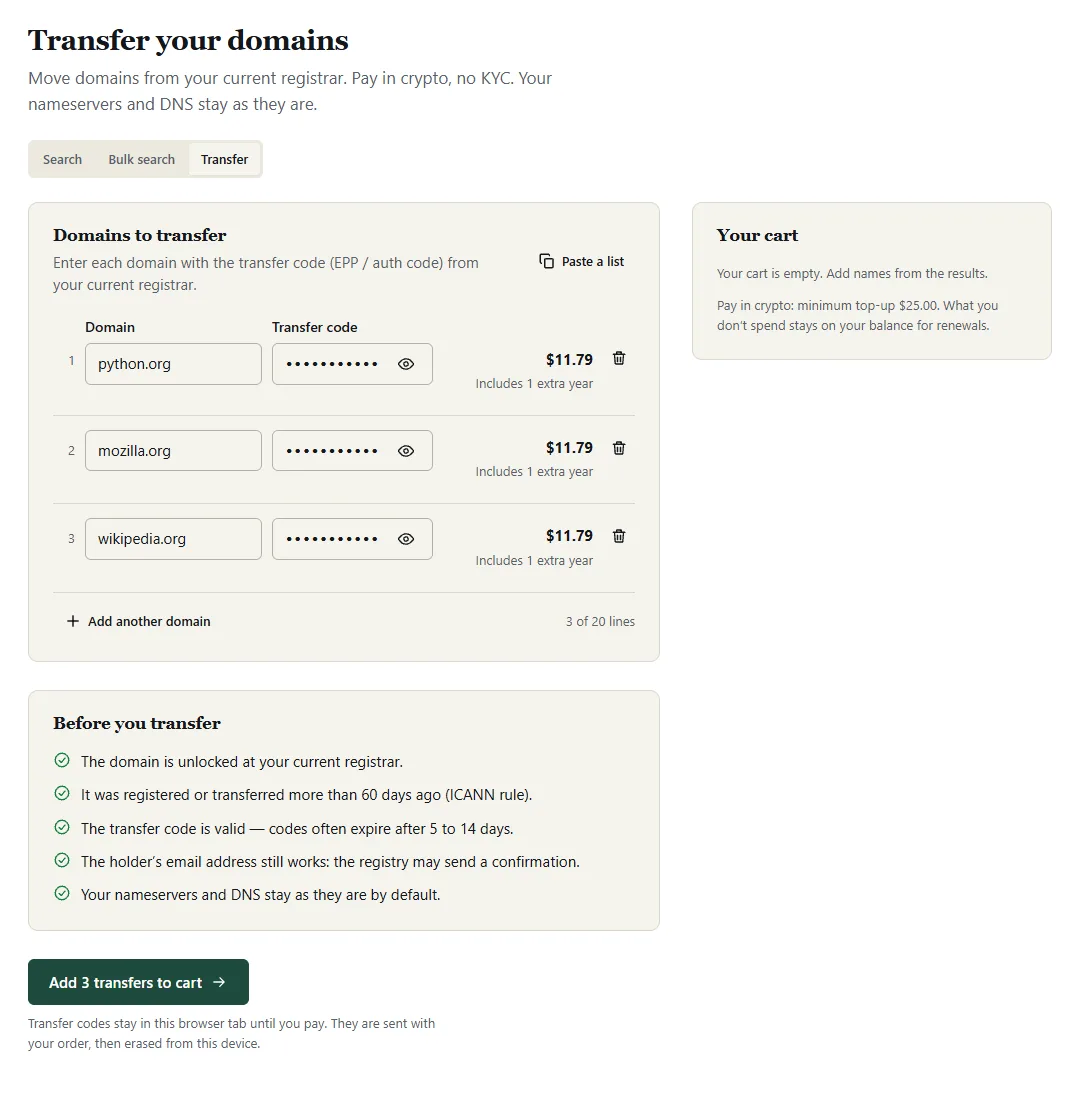
How do you transfer many domains at once with EPP codes?
In six steps: release the locks and export the codes, clean the list to two columns, paste 20 lines per form, add each form to the cart until it holds up to 100 domains, pay from a crypto balance, then approve at the old registrar or wait 5 days. Fifty .com cost $584.50; a hundred, $1,169.00.
Release the lock and export the codes
Turn the registrar lock off on every domain, then pull the codes with the route in the table above. Codes are case-sensitive: copy them, never retype them by eye.
Clean the list
Keep two columns, domain and code, one pair per line. Remove the header row, notes and any domain registered or transferred in the last 60 days.
Paste 20 lines at a time
Open the transfer form, use Paste a list, then Fill the lines. Fix any row the form flags, such as an extension we do not sell.
Add to the cart, repeat up to 100
Each Add to cart moves the checked rows into the cart. Keep current nameservers stays ticked when the cart holds only transfers, so DNS does not change.
Fund the balance and pay
Top up in Monero, Bitcoin, USDT, USDC, Ethereum, Solana or Litecoin, then pay the order. Each domain costs its listed transfer price, which includes one more year.
Approve or wait
After the payment is confirmed, our desk submits the batch. Your old registrar may email a confirmation: approve it, or the transfer goes through on its own after 5 calendar days. Typical durations: how long a domain transfer takes.
How long does an EPP code stay valid?
As long as your registrar decides: under the ICANN policy in force on 23 November 2026 there is no ICANN-wide expiry, and our transfer form reminds you that codes often expire after 5 to 14 days. The revised policy adopted on 7 June 2026 sets 14 days and one use, but it has no effective date yet.
In practice codes stop working in three ways:
- The registrar issues a new one. A Porkbun CSV export or the Cloudflare Regenerate button replaces the old code at once.
- The registrar's own timer runs out. Our transfer form reminds you that codes often expire after 5 to 14 days; ask your registrar for its figure.
- The lock goes back on. At Cloudflare, locking the domain and releasing it again issues a new code; other registrars have their own rules.
The safe order for a large move: export the codes on the day you paste them, and paste them in one sitting rather than over a week.
Is it safe to paste EPP codes into a website?
Yes, when the code goes only into a registrar's transfer form. At Zonequill, pasted codes stay in that browser tab until you pay, travel with the order over HTTPS, then sit in a protected file the desk uses to submit the transfer, never displayed again. Treat a code like the key to the domain while the lock is off.
In detail, here is what happens to the codes you paste:
- In the browser, codes sit in session storage, the storage of that one tab. They are hidden by default behind a show button and are never written to local storage, so closing the tab before paying drops them.
- At payment, they travel with your order over HTTPS.
- On our side, they are kept in a protected file that the desk uses to submit the transfer. They are never displayed again, in the account or anywhere else.
Zonequill staff never ask for your password, your account key or a transfer (EPP) code by email or chat; treat any message asking for one as fraud. Codes go into the transfer form and nowhere else: not in a support email, not in a chat. If you leave Zonequill later, you can get your outgoing code on request from your account at any time, except during the 60 days after a registration or an incoming transfer, and while a domain is expired.
Why does a bulk transfer fail with a code that looks right?
Usually because the code was replaced after you copied it, a comma or semicolon cut it in two in the paste box, the registrar lock is still on, or the domain sits in a 60-day window after registration, transfer or owner change. Match the reason below, fix it and put that line in a new order.
| What you see | Likely cause | Fix |
|---|---|---|
| Invalid authorization code | The code was replaced after you copied it (new export, Regenerate) or a character was mistyped | Request a fresh code and paste it, never retype |
| Code cut short in the form | The code contains a comma or a semicolon, which the paste box reads as a separator | Type that code into its own field |
| Transfer prohibited | The registrar lock (clientTransferProhibited) is still on | Turn the lock off at the old registrar; it must act within 5 calendar days |
| Denied: too recent | Registered or transferred less than 60 days ago | Wait for day 61 and transfer it in a later order |
| Denied: owner changed | A change of registrant set a 60-day lock | Wait out the lock |
| No code exists | A .uk domain, moved by IPS tag | Not sold here; keep it where it is |
| Domain suspended after the move | The holder email was not confirmed within 15 days | Click the verification link sent to that address |
What changes with ICANN's new Transfer Policy?
On 7 June 2026 the ICANN Board adopted the recommendations of the Transfer Policy Review. They are not in force on 23 November 2026: implementation is pending and no effective date has been published. Once they apply, a bulk move must fit inside the code's 14-day lifetime.
| Rule | In force today (policy of 21 Feb 2024) | Adopted 7 June 2026, no effective date |
|---|---|---|
| Delivery of the code | Within 5 calendar days without self-service | Within 120 hours (5 days) at most |
| Lifetime of the code | Set by each registrar | 14 days (336 hours), enforced by the registry |
| Reuse | Not limited by the policy | One-time use |
| Lock after creation or transfer | 60 days, the registrar may deny | 30 days, mandatory |
| Lock after a change of registrant | 60 days | Removed from the Transfer Policy |
| Confirmation email from the new registrar | In the text, enforcement deferred | Eliminated |
For a portfolio owner, the one-time code means a failed transfer needs a new code, not a second try with the old one.
Which registrars take the most domains per bulk transfer?
As of November 2026, NiceNIC, Porkbun, NameSilo and GoDaddy accept up to 500 domains per bulk submission, Namecheap 50, and Zonequill 20 per form and 100 per order. Zonequill is the only one of the six that takes Monero. If you need 500 lines in one paste and do not need Monero, the larger tools are faster to fill.
| Provider | List format | Max per submission | Crypto | Monero | .com renewal |
|---|---|---|---|---|---|
| Zonequill | domain code, space/tab/comma | 20 per form, 100 per order | 7 coins | Yes | $11.69 |
| NiceNIC | domain authcode, one per line | 500 | BTC, ETH, USDT, USDC, LTC and more (account funding) | No | $17.99 |
| Porkbun | domain authcode, space or tab | 500 | USDC via Coinbase | No | $11.81 |
| NameSilo | domain authcode, or file upload | 500 | Bitcoin | No | $19.99 ($12.00 in its Discount Program) |
| GoDaddy | one domain per line | 500 | None listed | No | $22.99 |
| Namecheap | domain, authcode | 50 | BitPay or BTCPay (account funds) | No | $19.98 + $0.20 ICANN fee |
Prices are list renewal prices for one year. Sources: each provider's bulk transfer and price pages, read 23 November 2026.
EPP code questions
What is an EPP code for a domain?
An EPP code, also called an auth code or transfer code, is a password that the current registrar issues for one domain. The new registrar sends it to the registry to prove the owner agreed to the move. Each domain has its own code, so a bulk transfer needs one code per line. Codes are case-sensitive and may contain symbols.
How long does a registrar have to give me the auth code?
Under the ICANN Transfer Policy in force in November 2026, a registrar without a self-service button must provide the code and remove the transfer lock within 5 calendar days of your request. The revised policy adopted on 7 June 2026 sets 120 hours, but it has no effective date yet. A registrar cannot hold the code back over a payment dispute.
Can I upload a CSV of EPP codes to Zonequill?
No. The transfer form takes a pasted list, one domain and its code per line, 20 lines per form. Open your registrar's CSV in a spreadsheet, place the domain and code columns side by side and copy them: the result pastes as tab-separated lines, which the form reads directly. Orders hold up to 100 domains.
How many domains can I transfer at once with Zonequill?
Twenty per transfer form and 100 per order. A larger portfolio goes in several orders: 300 domains means three orders of 100, each paid from a balance you fund in crypto, Monero included. If the names are very long, use orders of 50. Our desk can help plan the batches by email at [email protected].
Does transferring a domain with an EPP code add a year?
For a gTLD such as .com, .net or .org, yes: the transfer adds one year to the expiry date, up to a 10-year total. A .ai transfer is billed and extended by two years. For other country-code extensions it depends on the registry. The year added is part of the transfer price, so nothing more is charged for it.
Will Zonequill ask for my EPP codes by email?
No. Codes are entered only in the transfer form inside your account. Zonequill staff never ask for your password, your account key or a transfer code by email or chat, and any message that does should be treated as fraud. Forward it to [email protected].
Sources
- ICANN Transfer Policy (version of 21 February 2024), checked 23 November 2026. Sections I.A.3.7, I.A.3.8, I.A.5.2, I.A.5.4, I.A.15
- ICANN: domain name transfers, policy versions, checked 23 November 2026
- ICANN Board resolutions of 7 June 2026 (2026.06.07.04), checked 23 November 2026
- GNSO Transfer Policy Review final report, 4 February 2025, checked 23 November 2026. Recommendations 3, 6, 9, 13, 15, 18, 26.4
- GoDaddy help: get authorization codes via download, checked 23 November 2026
- Dynadot help: bulk EPP codes, checked 23 November 2026. Updated 22 October 2026
- Porkbun: how to export a list of domains as a CSV, checked 23 November 2026. Updated 26 August 2025
- Namecheap: how to bulk transfer domains in and out, checked 23 November 2026. Updated 23 April 2025
- NameSilo: domain EPP (auth) code information, checked 23 November 2026
- Cloudflare Registrar: transfer a domain out, checked 23 November 2026. Updated 24 April 2026
- NiceNIC bulk domain transfer, checked 23 November 2026
- Porkbun domain transfer, checked 23 November 2026
- NameSilo transfer domains, checked 23 November 2026
- GoDaddy bulk domain transfer, checked 23 November 2026
- Namecheap .com price change of 1 November 2026, checked 23 November 2026