Bulk transfer guide
Transfer domains from GoDaddy and pay in crypto
To transfer domains from GoDaddy and pay in crypto, Monero included, switch off the lock and Domain Privacy on each domain, then export one CSV with every authorization code. Paste the domain-and-code pairs into Zonequill's transfer form, 20 per form and 100 per order, and pay from a balance funded in Monero, Bitcoin or USDT.
| Coins accepted | BTC, USDT, USDC, ETH, SOL, LTC, XMR |
|---|---|
| Monero | Yes, sent straight to our wallet and matched by a person after 10 confirmations |
| Identity | No ID document, no phone; the registrant email must be confirmed within 15 days (ICANN rule) |
| Bulk limits | 20 domains per transfer form, 100 per order; a bigger portfolio goes in several orders |
| Paste format | One domain per line, then its code, split by a space, a tab or a comma |
| .com transfer | $11.69, adds one year to the expiry; renews at the same price |
| .com renewal at GoDaddy | $22.99 a year, list price checked 23 November 2026 |
| WHOIS privacy | Free and on by default once the domain arrives |
| Nameservers | Kept as they are by default when the order holds only transfers |
| Timing | GoDaddy: 15 to 30 minutes after you approve, otherwise released within seven days |
| Not offered | .uk and other ccTLDs that need a local registrant, CSV upload (paste only), public API, volume discounts |
Can you transfer domains from GoDaddy in bulk?
Partly. GoDaddy has bulk tools for two of the five jobs: exporting the authorization codes and approving the transfers. Its help pages describe the transfer lock and Domain Privacy switches one domain at a time, so those steps take a few clicks per name.
An authorization code (also called an EPP code or auth code) is the password a registrar issues for one domain; the new registrar needs it to request the transfer. The transfer lock is a registry status that blocks any transfer while it is on.
| Job at GoDaddy | One domain | Many domains at once |
|---|---|---|
| Remove Domain Protection | Domain settings, with an identity check | Not described |
| Switch off the transfer lock | Transfer toggle in domain settings | Not described |
| Switch off Domain Privacy | Domain settings, or done by the transfer-away flow | Not described |
| Get authorization codes | "Click here to see Authorization Code", or by email | Yes: CSV export with "Include authorization codes" |
| Approve the transfer out | Transfers Out, In Progress | Yes: Select All, then Approve Transfer |
On the receiving side, the general method for many names is in the bulk domain transfer guide. The steps below are the GoDaddy-specific part.
The five GoDaddy steps, in order
Five steps release a GoDaddy portfolio: downgrade Domain Protection, switch off the transfer lock, switch off Domain Privacy, export all authorization codes in one CSV and approve the transfers out. Steps 1 to 4 come before you order and step 5 after. Export the codes last: Porkbun's GoDaddy notes say they may change after the lock or privacy step.
Downgrade Domain Protection to none
Domain Protection is a paid GoDaddy add-on that blocks transfers. Changing it asks for a 2-step verification code (if 2SV has been on for at least 24 hours) or a one-time passcode sent to the email on your GoDaddy account.
Switch off the transfer lock
In the Domain Portfolio, open each domain's settings and set the Transfer toggle to Off. GoDaddy says the change can take up to 90 minutes to show in the account.
Switch off Domain Privacy
Your contact details have to be visible to the losing registrar for the transfer to go through. If you start GoDaddy's "Transfer to another registrar" flow for a domain, GoDaddy turns privacy off itself. Free WHOIS privacy comes back on at Zonequill as soon as the domain arrives.
Export every code in one CSV
In the Domain Portfolio, tick the box next to Domain Name and choose Select All, open the action menu, pick Export as .CSV, tick Include authorization codes and press Export domains. Download the file from the message or later from Exported Lists, where it stays for 28 days.
Approve once the transfers start
After your order is submitted, go to Transfers, then Transfers Out, tab In Progress. Select All and press Approve Transfer. GoDaddy says approved transfers finish in 15 to 30 minutes; without approval it releases them on its own within seven days.
Bringing the list into Zonequill, step by step
Paste the list: Zonequill takes domains through a Paste a list box, 20 lines per form and 100 per order, not a file upload. Trim the GoDaddy export to two columns, domain name and authorization code, and copy them straight from the spreadsheet, since tabs are accepted. Fifty .com transfers cost $584.50 in total, paid in crypto.
northwind-ledger.com	Xq7!pL2#vR9t
bluefinch.net,K3m$Wz81@aQe
atlas-forge.org Hd5^tY0&cB4n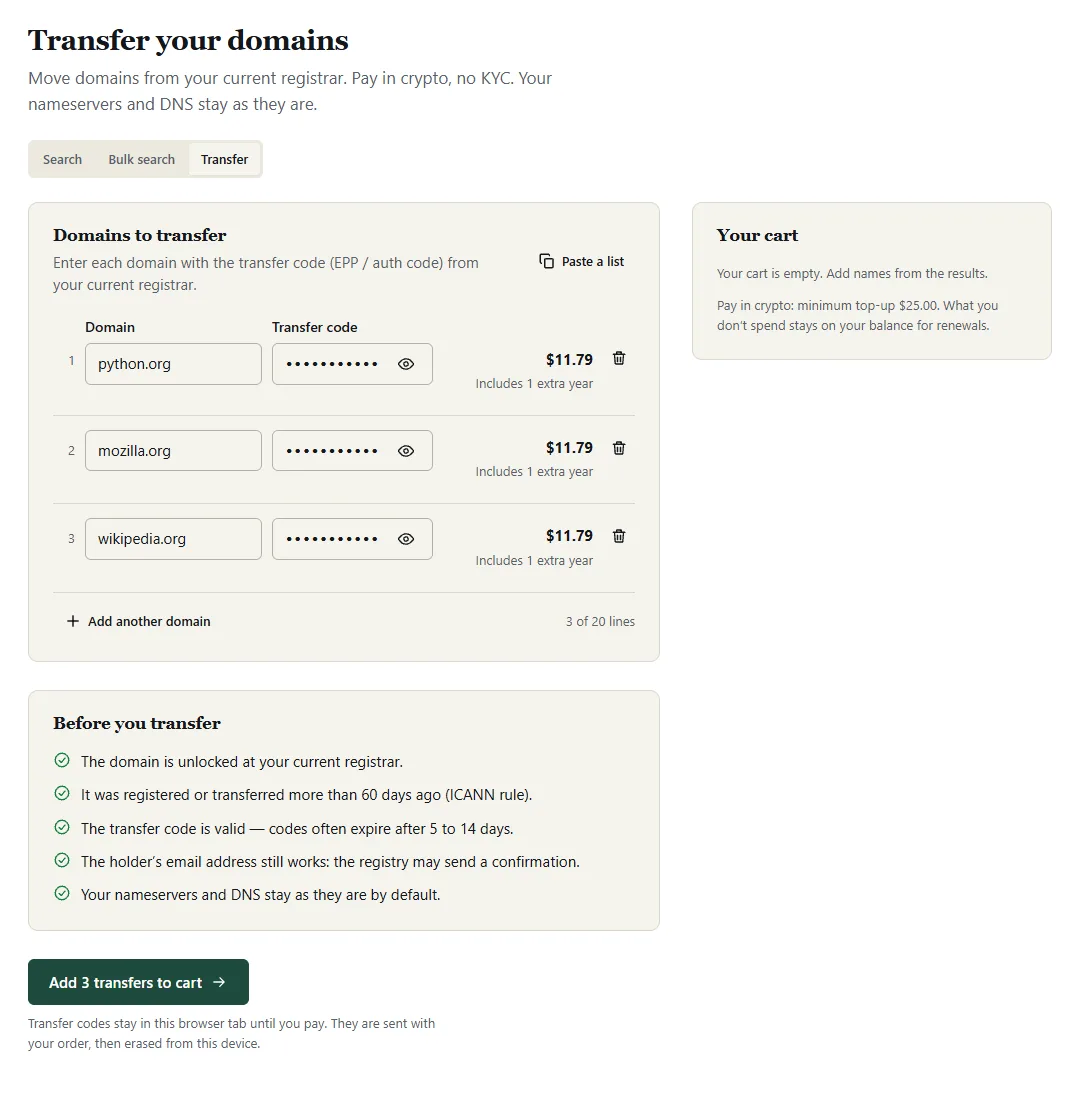
Fund the balance in crypto
Fifty .com transfers cost 50 × $11.69 = $584.50. Each top-up runs from $25 to $10,000, in Monero, Bitcoin, USDT, USDC, Ethereum, Solana or Litecoin. Details on how to pay.
Paste 20 lines per form
Open the transfer form, press Paste a list, paste up to 20 lines and press Fill the lines. A 21st line is left out, and the form says how many were skipped. Add these 20 to the cart, then paste the next ones.
Fill the cart, up to 100 domains
Fifty domains are three forms (20, 20 and 10) and one order. Three hundred domains are three orders of 100: $3,507.00 if they are all .com. With very long names, split orders into 50.
Check out
Keep current nameservers is ticked by default when the cart holds only transfers. Enter the registrant email: a verification link goes out, and ICANN rules suspend the domain if it is not confirmed within 15 days. The address never appears in public WHOIS.
The desk submits, you approve at GoDaddy
A person submits each batch to our ICANN-accredited partner registrar once the payment is confirmed. Then approve at GoDaddy (step 5 above) to skip the wait.
Price your GoDaddy export
Paste the domain column of the CSV, one name per line. The totals use this site's prices; nothing leaves your browser.
- Domains recognised
- —
- Transfer orders needed
- —
- Transfer total (adds a year)
- —
- Renewal per year after that
- —
Orders hold up to 100 lines and each transfer form takes 20 domains with their codes. Extensions we do not sell are flagged in red.
Open the transfer formHow much does it cost to keep 50 .com domains at GoDaddy?
Fifty .com domains cost $1,149.50 a year at GoDaddy (50 × $22.99 list renewal) and $584.50 at Zonequill (50 × $11.69), as of November 2026: $565.00 less each year. Over three years that is $3,448.50 against $1,753.50. The transfer pays the first Zonequill year, added on top of the time already paid.
GoDaddy charges renewals at the then-current retail price (checked 23 November 2026), and Zonequill charges one price for a .com transfer and renewal, $11.69 a year; the $8.00 first year applies only to a new registration, which then renews at $11.69. The table multiplies the yearly price by 50 domains and the years kept, so no prepaid time at GoDaddy is lost in the sums.
| Years kept | GoDaddy, 50 × $22.99 | Zonequill, 50 × $11.69 | Difference |
|---|---|---|---|
| 1 year | $1,149.50 | $584.50 | $565.00 |
| 3 years | $3,448.50 | $1,753.50 | $1,695.00 |
| 10 years | $11,495.00 | $5,845.00 | $5,650.00 |
Today's prices held flat. Neither registrar guarantees a price for ten years: Zonequill's grid is valid until 31 March 2027, and Verisign raised its own .com fee on 1 November 2026.
Which domains can't leave GoDaddy yet?
Domains registered or transferred in the last 60 days, bundle domains under 120 days old, names still under Domain Protection, names in redemption, and ccTLDs such as .uk or .de cannot move to Zonequill now. ICANN's Transfer Policy lets the current registrar refuse a transfer for 60 days after a registration or a previous transfer, and GoDaddy applies that rule.
| Case | Can it move now? | What to do |
|---|---|---|
| Registered or transferred in the last 60 days | No | Wait until day 61 |
| Contact change where a 60-day lock was accepted | No | Wait out the lock |
| Part of a GoDaddy bundle, under 120 days old | No | Wait until day 121 |
| Domain Protection still on | No | Downgrade it to none first |
| Expired, not yet in redemption | Yes, per GoDaddy | Move it early: a 5-to-7-day wait can carry it into redemption |
| In the redemption period | No | Restore it at GoDaddy first |
| .uk, .de, .nl, .ch, .cc, .to and other ccTLDs that need a local registrant | Not to Zonequill | Keep them at a registrar that sells them |
| .ai | Yes | Billed for 2 years, the registry adds 2 |
The redemption period is the 30 days after a gTLD is deleted at expiry, when only the last holder can restore it, usually for a fee. Typical wait times for each stage are on the domain transfer time page.
Where can you transfer GoDaddy domains in bulk and pay with crypto?
As of November 2026, Porkbun and NiceNIC take 500 domains per submission and Namecheap 50, paid with USDC, several coins or BitPay, but none of them takes Monero; Njalla takes Monero without a published bulk tool. Zonequill takes 20 domains per form and 100 per order, paid in Monero or six other coins. GoDaddy itself accepts no cryptocurrency.
| Provider | Coins | Monero | Bulk transfer limit | .com renewal | WHOIS privacy | API |
|---|---|---|---|---|---|---|
| Zonequill | XMR, BTC, USDT, USDC, ETH, SOL, LTC | Yes | 20 per form, 100 per order | $11.69 | Free | No |
| Porkbun | USDC via Coinbase Business | No | 500 at a time | $11.81 | Free | Yes |
| Dynadot | BTC, LTC, USDT, USDC (deposit) | No | Not stated | $11.62 | Free | Yes |
| NiceNIC | BTC, ETH, USDT, USDC, LTC (account funding) | No | 500 per submission | $17.99 | Free on eligible TLDs | Yes |
| Namecheap | BTC, BCH, ETH via BitPay or BTCPay (funds) | No | 50 per submission | $19.98 + $0.20 | Free | Yes, with conditions |
| Njalla | BTC, LTC, XMR, ETH | Yes | Not published | €15 | Domain held in Njalla's name | Not confirmed |
Porkbun and NiceNIC take 500 domains in one submission and offer an API; Zonequill does neither. What none of the other five shows, as of November 2026, is a bulk transfer tool together with Monero: that pairing is what Zonequill adds. Njalla takes Monero but registers each domain in its own name, while at Zonequill the domain stays registered to you.
Questions about leaving GoDaddy
Can I transfer domains from GoDaddy in bulk and pay with crypto?
Yes, but not to GoDaddy's own checkout, which takes no crypto. Export the codes from GoDaddy in one CSV, then paste them at a registrar that accepts coins. At Zonequill that means 20 domains per form, 100 per order, paid from a balance funded in Monero, Bitcoin, USDT, USDC, Ethereum, Solana or Litecoin, with no ID document.
How do I get the auth codes for all my GoDaddy domains at once?
In the Domain Portfolio, select all domains, choose Export as .CSV in the action menu and tick Include authorization codes. The file can be downloaded for 28 days from Exported Lists. Export after switching off the locks and privacy, because codes can change after those steps.
Do I have to turn off GoDaddy Domain Privacy (Domains By Proxy)?
Yes. GoDaddy's help says Domain Privacy is turned off during the transfer-away flow so your contact details transfer correctly, and a domain whose details stay hidden can be refused. The gap is short: at Zonequill, WHOIS privacy is free and switched on for every extension we sell as soon as the domain arrives.
How long does a transfer out of GoDaddy take?
GoDaddy says transfers out usually take 5 to 7 days. If you approve them under Transfers Out, it says they finish in 15 to 30 minutes, depending on the new registrar. At Zonequill, the desk submits a batch after the payment is confirmed; a Monero payment is checked by a person, so allow a little longer.
Will my websites and email stop working during the move?
Not if the nameservers stay the same, which is the default for a transfer-only order. Check where they point first: if your domains use GoDaddy's own DNS, you still rely on a GoDaddy service after the move. To leave entirely, import each zone file at Zonequill, then change nameservers for up to 100 domains in one action.
Does GoDaddy charge a fee to transfer domains out?
GoDaddy's transfer-away help lists no fee. ICANN's Transfer Policy obliges every registrar to hand over the authorization code within five calendar days if there is no self-service option, and forbids refusing a transfer over a payment dispute. The cost sits on the receiving side, where a transfer is priced like one year's renewal.
Sources
- GoDaddy Help: Transfer my domain away from GoDaddy, checked 23 November 2026. 60-day and 120-day rules, 5 to 7 days, expired domains until redemption, codes by CSV export
- GoDaddy Help: Export a list of my domains, checked 23 November 2026. Export as .CSV, Include authorization codes, files kept 28 days
- GoDaddy Help: domain lock setting (article 410), checked 23 November 2026. Transfer toggle per domain, up to 90 minutes, Domain Protection identity check
- GoDaddy Help: Approve a transfer away from GoDaddy, checked 23 November 2026. Select All, Approve Transfer, 15 to 30 minutes, automatic within seven days
- GoDaddy: bulk domain transfer and .com pricing, checked 23 November 2026. .com $22.99 a year list price; no crypto among GoDaddy's payment methods
- ICANN Transfer Policy (version of 21 February 2024), checked 23 November 2026. 60-day denial reasons, code within 5 calendar days, one year added on transfer
- Porkbun: Migrating domains from GoDaddy, checked 23 November 2026. Codes can rotate after privacy removal or the lock change
- Porkbun: domain transfer, checked 23 November 2026. 500 domains at a time
- Namecheap: bulk transfer in and out, checked 23 November 2026. 50 domains per submission
- NiceNIC: bulk domain transfer, checked 23 November 2026. 500 domains per submission
- Dynadot: TLD prices, checked 23 November 2026. .com renewal $11.62
- Njalla: pricing, checked 23 November 2026. .com €15 a year